
How AI document reading differs from plain OCR, where it is used across departments, and what to prepare before cutting manual data entry in your organization.
In many organizations, people still spend whole days reading documents and typing the same data into systems: supplier invoices, purchase orders, copies of customer ID cards, insurance claim forms. Each task looks small, but over a month it adds up to a lot of time and a steady stream of follow-on problems.
This article explains how AI document reading works, how it differs from traditional OCR, which kinds of work it suits, and what an organization should prepare before starting.
The hidden cost of manual data entry
Staff time is the obvious cost, but there are others that are easy to miss.
- Mistakes. One wrong digit in a tax ID, a date or an amount can lead to a wrong payment, a wrong tax filing, or rework across several documents.
- Work that waits. Month-end closing, purchase approvals and onboarding new customers often stall at the data entry step.
- Hard to scale. As the business grows, so does the volume of documents, and the only way to keep up is to hire more people.
- Skilled people doing repetitive work. People who understand accounting or customers should spend their time checking and deciding, not retyping.
Plain OCR versus AI that reads documents
OCR (Optical Character Recognition) turns images of text into text a computer can use. It has been around for a long time and is useful, but it has one important limit: OCR knows what the characters say, not what the text means.
For example, a tax invoice may carry two 13-digit numbers. OCR can read both, but it cannot tell which one is the seller’s tax ID and which is the buyer’s. Older systems got around this with fixed positions on the page (templates), which works when every document looks the same and breaks as soon as a new supplier uses a different layout.
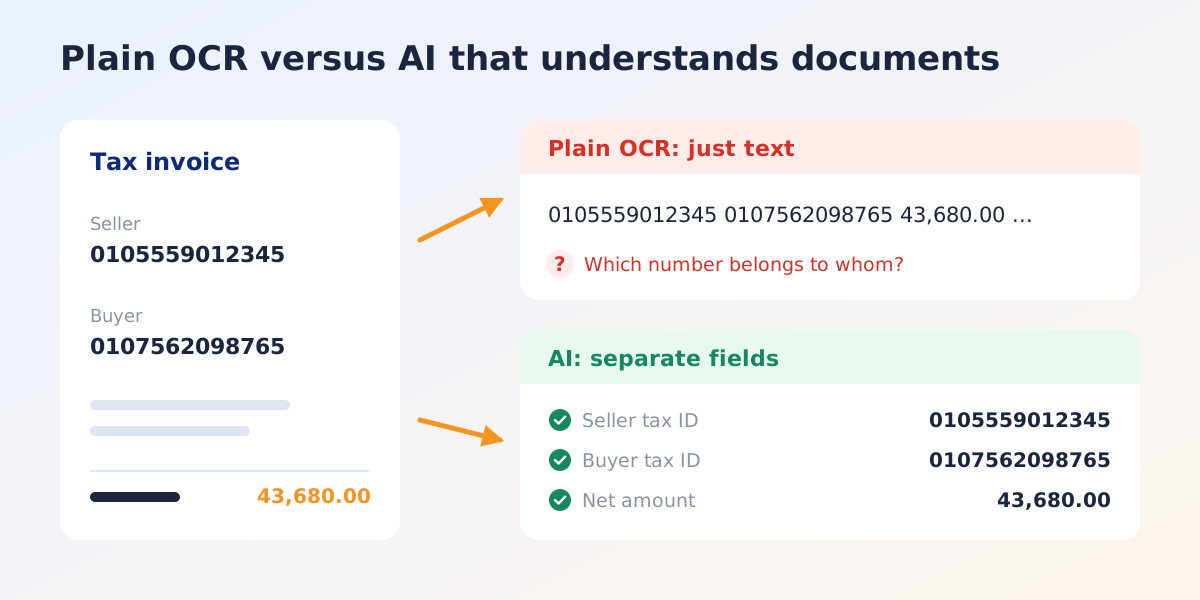
Modern document reading, often called Intelligent Document Processing (IDP), uses AI for the steps OCR cannot do.
- Understands context. It knows that the number next to “Seller” belongs to the seller, even when every document is laid out differently.
- Classifies documents. It tells an invoice from a credit note or a quotation, and splits several documents that arrive in one file.
- Returns structured data. The result is not a block of text but clearly separated fields, such as document number, date, subtotal, VAT, withholding tax and each line item.
- Copes with poor input. Skewed scans, phone photos and documents that mix Thai and English.
Where it is used
Accounting is the most common starting point, but the same approach works for almost any document that someone reads and types into a system.
- Finance and accounting: invoices, tax invoices, credit notes, quotations, billing notes
- Purchasing and warehouse: purchase orders, delivery notes, goods received notes, to match what was ordered with what arrived
- Customer onboarding and KYC: ID cards, company certificates, VAT registration certificates, bank book covers
- Insurance and healthcare: claim forms, medical certificates, hospital receipts
- Logistics and import/export: customs declarations, bills of lading, packing lists
- HR and administration: job applications, forms of all kinds, payment slips
Where the data goes next
Reading the document is only half the job. The other half is getting the data into the system that uses it. There are three common patterns.
- Export a file, such as Excel or CSV. Good for getting started, or for teams that still import data in batches.
- Send JSON through an API, so an ERP, accounting or internal system receives the data automatically, with no one in between.
- Combine with a review step. The system reads first, and staff check only the items it is unsure about, or amounts above a threshold, before they go into the system.
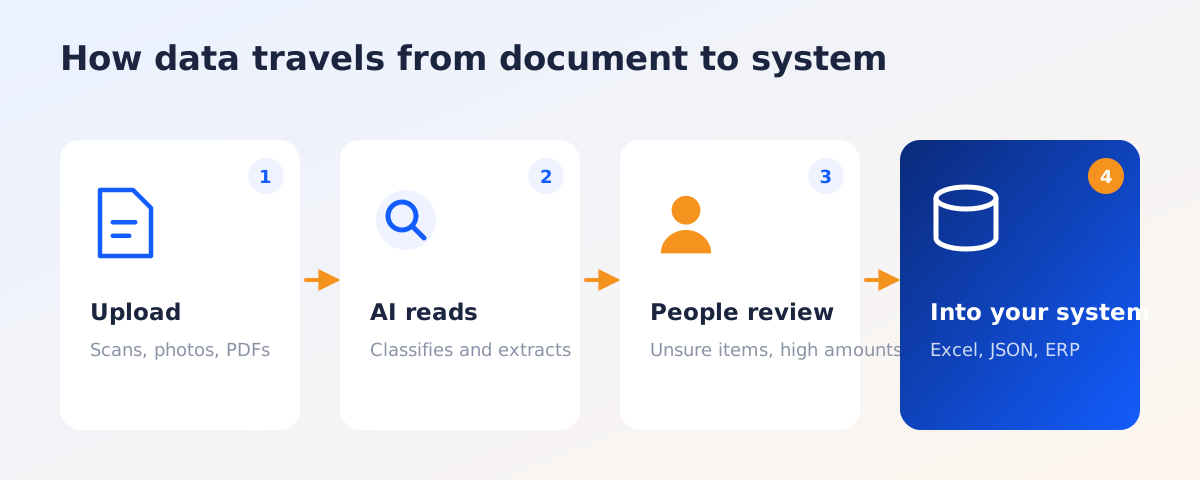
In practice the third pattern usually works best at first: the team keeps control of quality and reduces checking as confidence grows.
What to prepare before you start
Before choosing a tool or a provider, answer these questions inside your team. It makes conversations with providers more focused and comparisons easier.
- Which document type takes the most time? Pick one or two with high volume and varied layouts as the starting point.
- How many per month? This helps you judge value and choose a suitable pricing model.
- Which fields do you actually need? List the fields you use. There is no need to extract everything on the page.
- Where must the data go? Can the target system receive data through an API, or does it need a file import?
- Who checks, and what? Decide which items must always be seen by a person first.
- Data security. Documents such as ID cards or medical certificates contain personal data. Ask providers how they separate each organization’s data, control user access and log who accessed what.
- Collect real samples. Gather 20 to 50 real documents with variety, both clear and poor quality, to test before you decide.
How to tell whether it pays off
Practical measures that are easy to collect:
- Average time per document, before and after
- Share of documents that pass without correction
- Errors found in later steps, such as payment or tax filing
- Time to close the books, or time to onboard a customer
Record the “before” numbers too. Many organizations find, when it is time to report results, that they have nothing to compare against.
Summary
Using AI to read documents is not about replacing people. It moves their time from retyping to checking and deciding. A good start is to pick the one document type that causes the most pain, test it with real documents, measure clearly, and then expand to other types.