How an in-house AI chatbot differs from general AI tools, from data sources and access control to working with internal systems, and how to choose a good first use case.
Now that ChatGPT and other AI tools are widely known, many organizations are asking the same question: “If our people use AI at work, should they use general tools, or should we have our own AI chatbot?” The answer depends on what the AI is used for. This article explains the key differences and shows which kinds of work suit each.
Difference one: general knowledge or company data
General AI tools learn from huge amounts of data on the internet. They are good at general knowledge, writing, summarizing and translating, but they do not know your company’s leave policy, which product price changed last month, or the latest expense claim procedure.
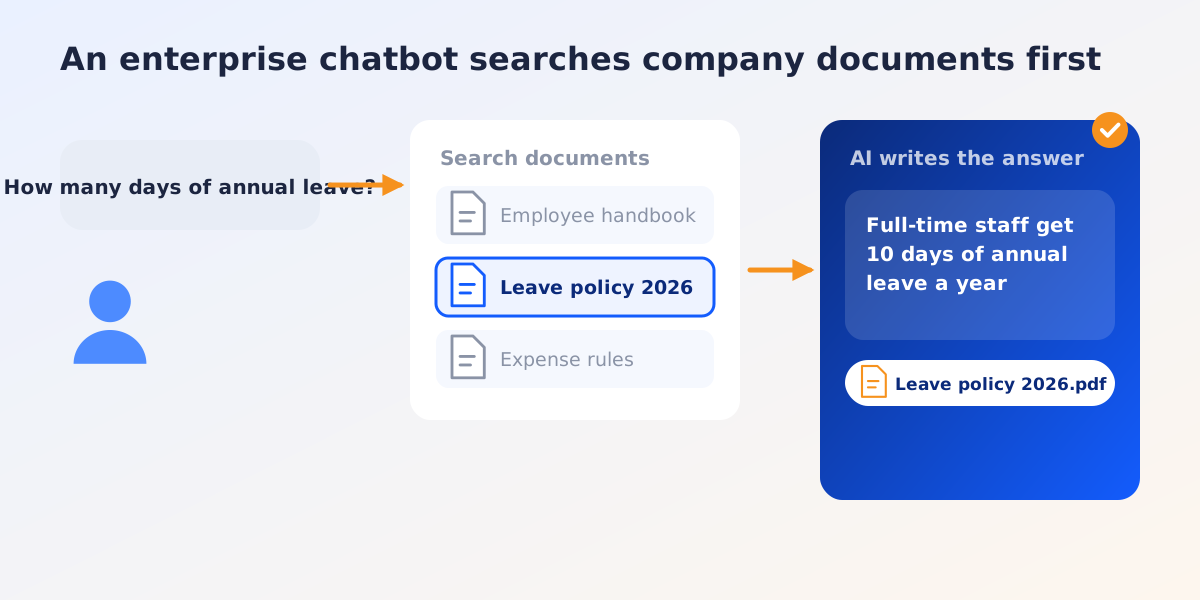
Enterprise AI chatbots usually use an approach called RAG (Retrieval-Augmented Generation). The idea is simple: before answering, the system searches the company’s own sources, such as manuals, policies or a knowledge base, and the AI writes its answer from those documents. As a result:
- Answers are based on the company’s own information, not guesses from general knowledge.
- Sources can be shown. Users can open the original document to check.
- Answers follow the documents. When a policy changes, the answers change too, without retraining the AI.
Difference two: who sees what
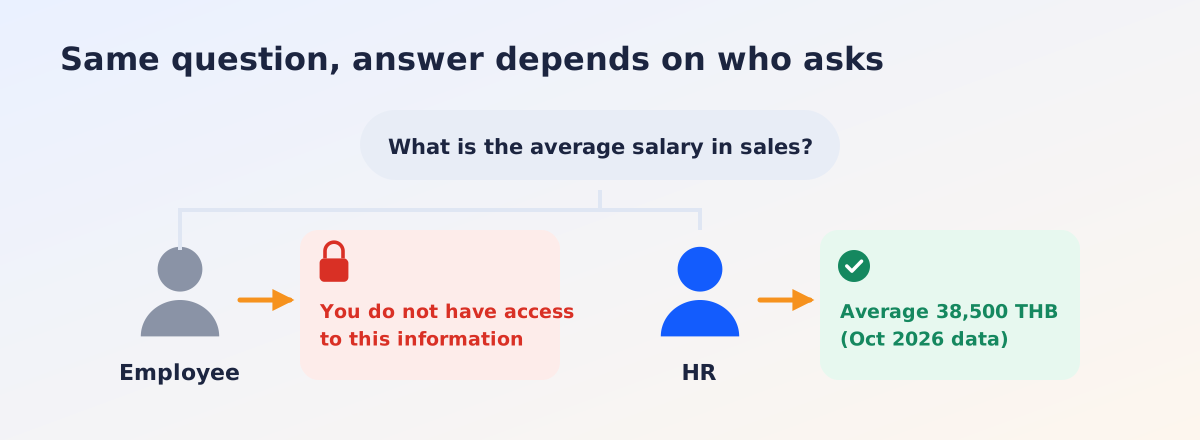
In an organization, different people should see different information. Staff should not see each other’s salaries, and the sales team does not need every legal document.
General AI tools know nothing about your company’s access structure. A well-designed enterprise chatbot checks the user’s permissions before searching, and answers only from documents that person is allowed to see. Ask every provider about this clearly: if it is designed badly, information can leak inside the organization itself.
Difference three: answering questions or doing work
Early chatbots could only answer questions. The current trend is to let AI also work in systems, often called AI agents. For example:
- A salesperson types “Create a quotation for customer A, product B, quantity 20” and the system prepares a draft to review.
- Purchasing asks “Which purchase orders have not been received yet?” and gets a list from the real system.
- An employee asks how much leave they have left and gets the answer from the HR system.
This requires connecting to internal systems through APIs, and there should be a step where a person confirms before anything with financial impact or anything sent outside the organization.
Difference four: where the data goes
When staff paste information into a public AI tool, that information leaves the organization’s control, under that service’s terms of use. For general information this may be fine, but customer data, contracts and financial figures need a clear policy.
An enterprise chatbot opens up more options: choosing AI services whose terms exclude training on your data, logging usage for later review, or running AI models on the organization’s own servers for the most sensitive data.
The differences at a glance
| General AI tools | Enterprise AI chatbot | |
|---|---|---|
| Source of knowledge | General knowledge from the internet | The company’s documents and systems |
| Shows sources | Not always | Can link to the original document |
| Access control | Does not know the company structure | Answers according to the user’s permissions |
| Works in systems | No | Can connect to internal systems |
| Data control | Under the provider’s terms | More control for the organization |
| Getting started | Immediately | Needs data preparation and system connections |
The two do not replace each other. Many organizations use both: general tools for writing, summarizing and work without sensitive data, and an enterprise chatbot for work that needs internal information.
Which work makes a good start
Good first use cases tend to share three traits: many repeated questions, answers that already exist in documents, and small mistakes that do not cause serious harm. For example:
- HR: benefits, leave, claim rules, steps for new employees
- IT helpdesk: setup guides, password resets, common problems
- Sales and customer service: product specifications, warranty terms, frequently asked questions
- Purchasing and accounting: document status, approval steps, payment rules
Recommended first steps
- Pick one department and one task with many repeated questions and a clear content owner.
- Collect and clean up the documents. Remove old versions that are no longer used, because a chatbot answers only as well as the documents it gets.
- Set permissions from the start: who sees which group of documents.
- Pilot with a small group of real users. Collect the questions it could not answer or answered wrongly, and improve the documents or settings.
- Measure, for example how many questions it answers on its own, time saved for the team, and user satisfaction.
- Expand step by step to other departments, or add the ability to work in systems.
Summary
An enterprise AI chatbot is not “smarter” than general AI tools, but it “knows your company” better and can be controlled more closely. Success depends on the quality of the documents, the design of access rights and choosing the right first task, more than on the technology alone.